This article explains how to start with AI if you’re not an engineer and would like to manage non-technical tasks. It is based purely on my own experiments and discussions with my colleague Tomek Żernicki who is a proficient AI user.
What you should start with
First all of you need to understand some fundamentals – how to write a quality prompt, what context is and which models you can choose.
Prompts
Writing great prompts is like explaining something to a student or a junior employee. You can’t just tell them to “do this or that” because they don’t have enough experience yet.
This means to set a clear goal and required output (you can add an example) and provide the context.
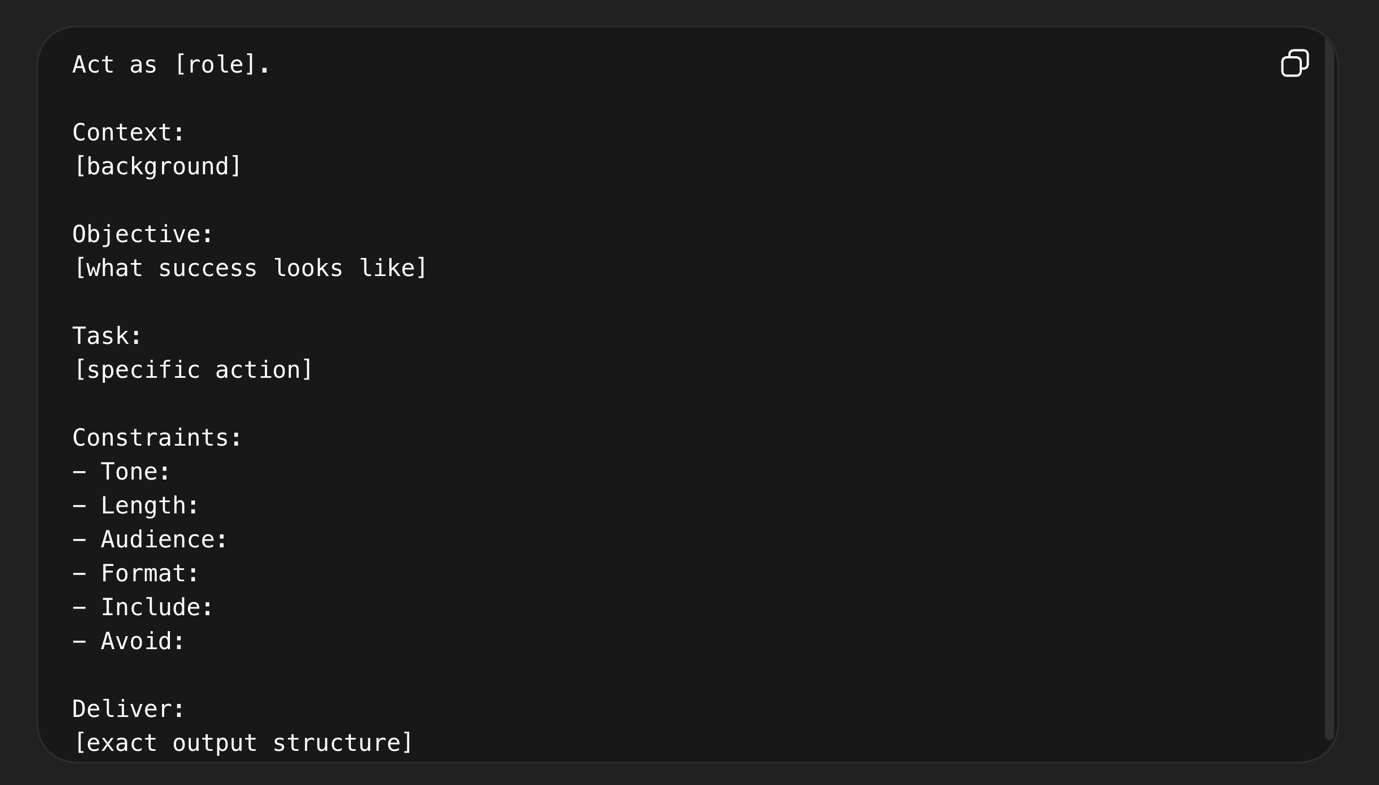
Figure 1 – How to structure a prompt
Context
Context in AI is the layer of meaning that transforms raw input into a relevant, actionable understanding. It includes who the user is, what problem they are trying to solve, and the specific domain they operate in. The same question can lead to completely different answers depending on the context. Without it, AI produces generic advice. With proper context, however, AI becomes a powerful tool that delivers precise insights aligned with real industry challenges.
Here is an example.
Act as a product manager whose role is to evaluate an idea for a plugin and conduct market analysis, analyse the demand and user requirements. You work for a small plugin company with 10 employees and currently multiple other companies have released products in voice editing and post-production and want to go there too. Our limitation is that we don’t have cash, so we can only develop something that in three months has to be already on the market.
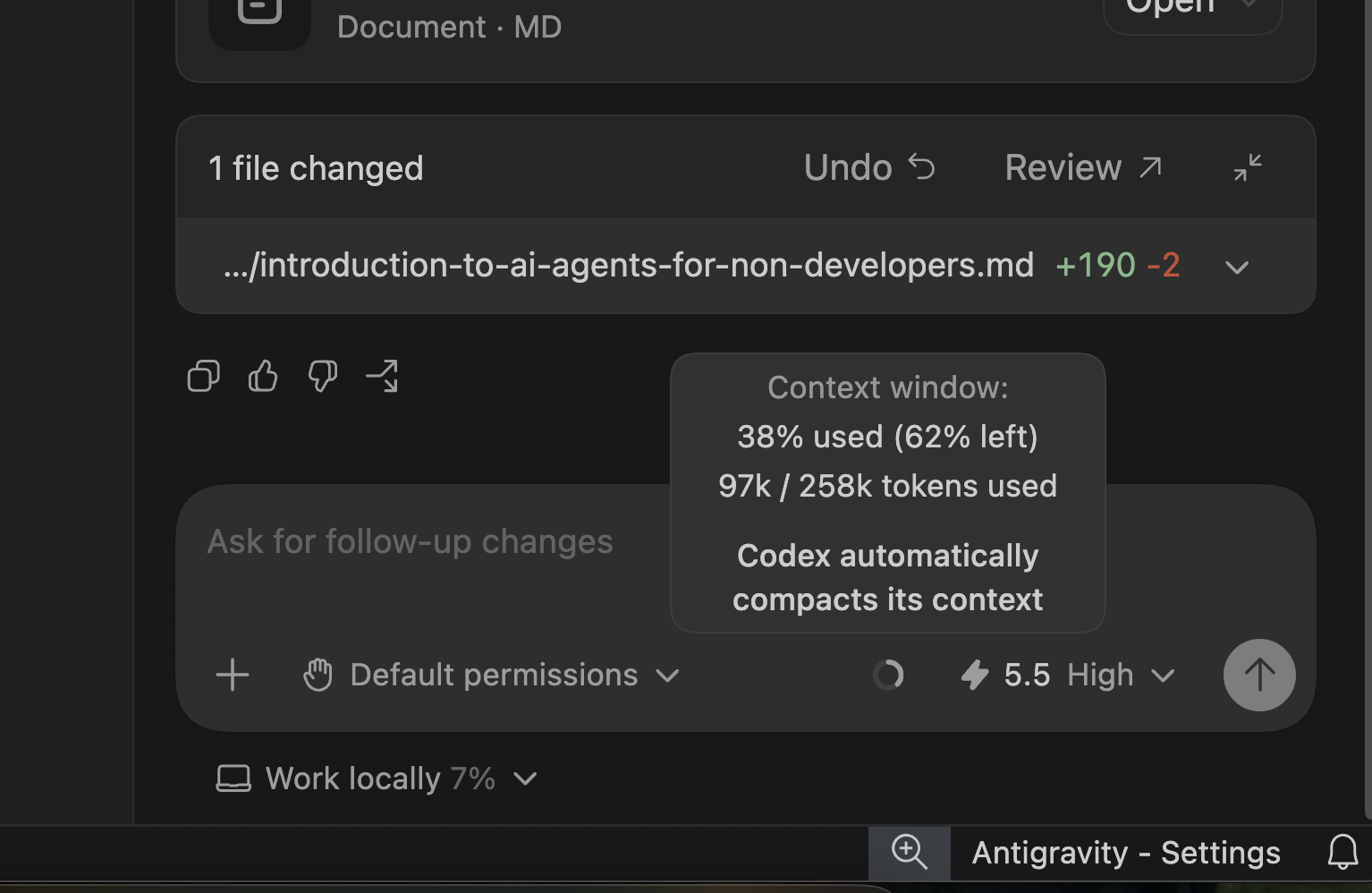
When working with Large Language Models (LLMs) like ChatGPT, Claude, or Gemini, you will often hear terms like “token limits,” “context window,” or “memory.” These concepts are fundamental to how AI works and understanding them can significantly improve how you use these tools.
At a basic level, memory is the amount of information an AI model can process in a single interaction. Every chat has a limit. For example, Anthropic’s Claude models typically support around 200,000 tokens (roughly tens of thousands of words), while newer versions like Claude 3.5 Sonnet or Opus can handle up to 1 million tokens, allowing them to process entire documents, codebases, or long conversations.
However, there is an important caveat: just because a model can technically handle a large context does not mean it fully understands everything within it. As you approach or exceed the limit, the model begins to compress or prioritise information, which can lead to degraded quality or even hallucinations. In practice, this means that managing context effectively is just as important as having access to a large one.
Different AI providers offer different context capacities:
- OpenAI (GPT models): From ~16k tokens (older models) up to ~128k and even ~400k in newer versions
- Anthropic (Claude): Typically 200k tokens, with newer models reaching up to 1 million
- Google (Gemini): Up to 1–2 million tokens depending on the version
- xAI (Grok): Up to ~2 million tokens
- Open-source models: Usually between 8k and 256k, with some advanced models reaching higher
To simplify:
- Small (8k–32k): Basic conversations
- Medium (100k–200k): Documents and analysis
- Large (1M+): Entire systems, books, or repositories
Most AI chat interfaces (ChatGPT, Gemini, Grok) do not show token usage, because tokens are considered a technical concept. However:
- Claude often shows context usage when approaching the limit (very helpful)
- Developer tools (APIs, playgrounds) provide full visibility
- Open-source tools (LM Studio, Ollama) usually show everything
Models
More advanced users claim that specific large language models are particularly good at certain tasks. Personally, I don’t have enough experience to validate claims provided in various articles, but I have spent most of the time writing content with GPT, doing research using Google’s Gemini and NotebookLM and vibe coding web pages using Gemini. I am pretty satisfied with those.
Below you can find three major players and tools they provide, from chat through functionalities like projects and gems to their tools for developers.
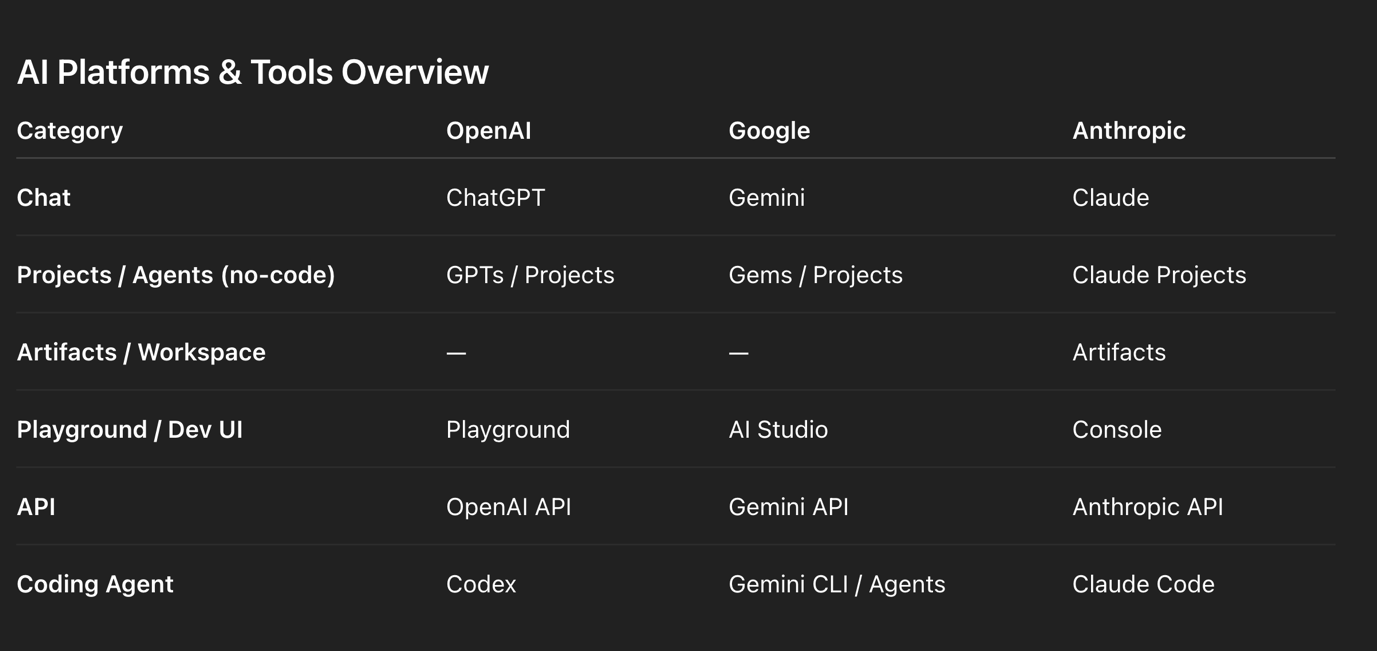
Figure 2 – Key tools provided by major AI companies
Building your AI toolkit
There are two basic ways to work with AI
- Web-based tools look like ChatGPT, Gemini, Claude
- IDE desktop tools.
Beginners usually start working with web-based tools like ChatGPT, Gemini or Cloud. Although they seem pretty basic, they have some major advantages. First of all, their interface is pretty simple. You can also create projects that you can share with other employees in your company to collaborate using AI.
Here comes a powerful tip for beginner users: create a project (in ChatGPT and Claude) or Gem (in Gemini ). You can upload context to this project, upload additional files and instructions, or even tell him to play different roles and initiate different instructions uploaded to the project.
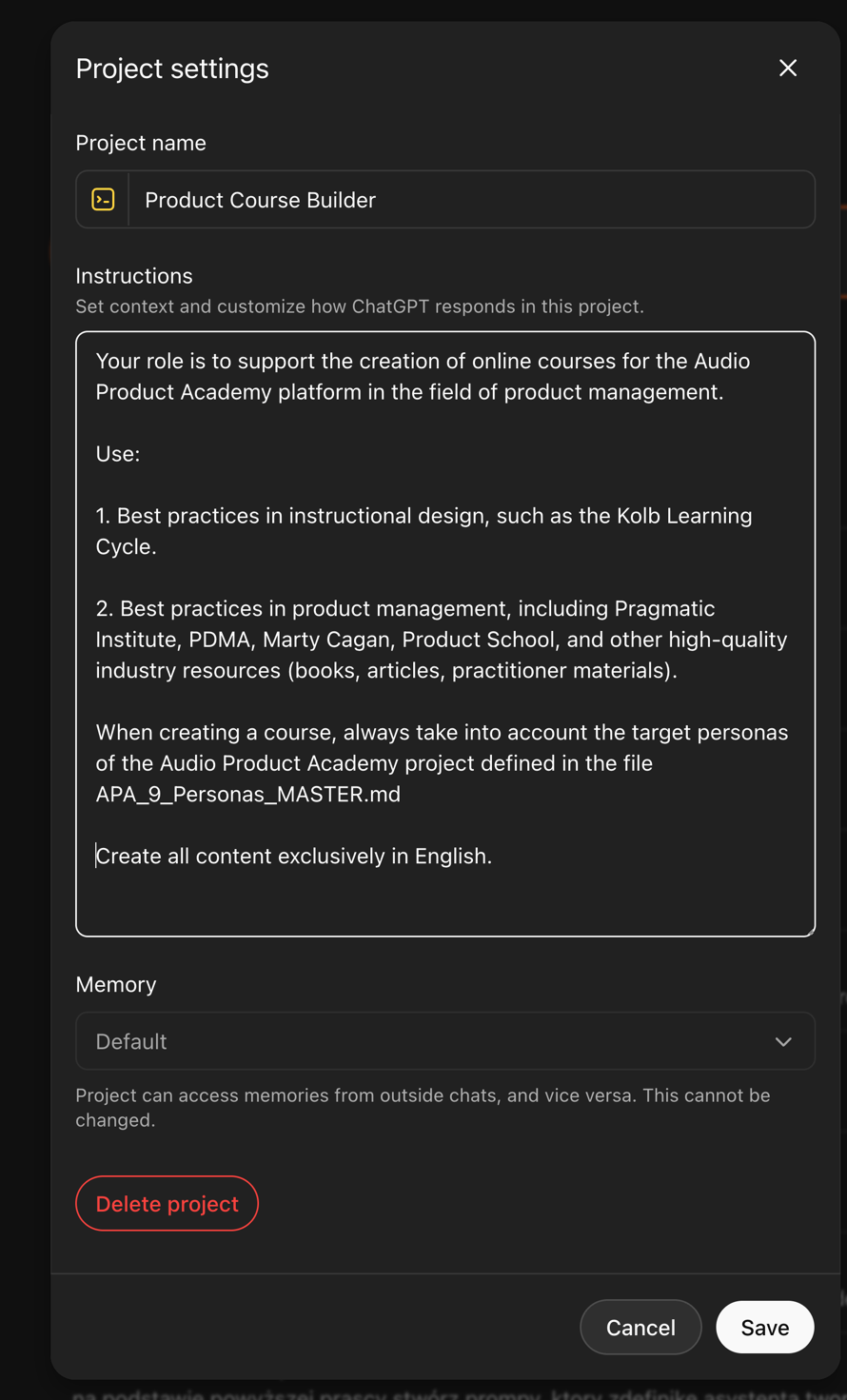
Figure 3 – Master prompt in ChatGPT project
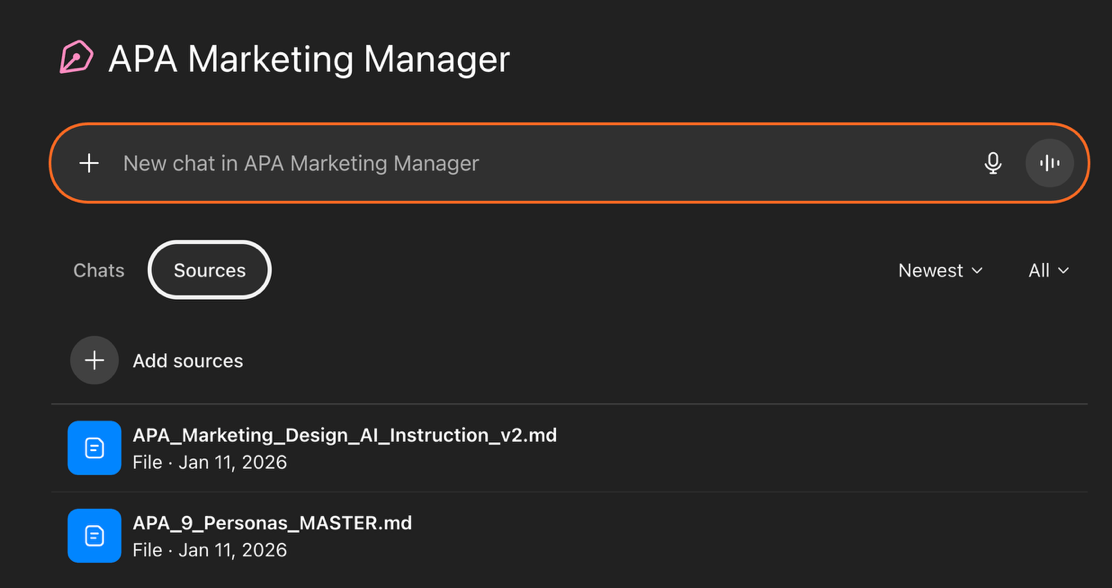
Figure 4 – Uploading files to GPT Projects
If you master this, you can truly go beyond by installing IDE tools like Visual Studio Code (VS Code) or Eclipse. It can be intimidating at first if you are not used to writing code. I chose Antigravity from Google. Although this tool is still in the preview mode and only available for private users, It has all the advantages of using AI locally mixed with the Agent Manager view, which is similar to browser-based tools.
Connecting MCP and external APIs such as LinkedIn, Facebook, Jira, or Confluence through an IDE rather than directly from a browser-based interface like ChatGPT or Gemini provides significantly greater control, reliability, and scalability.
An IDE-based setup allows you to properly manage authentication flows (e.g., OAuth 2.0), securely store and refresh tokens, and implement robust error handling, logging, and retry mechanisms—capabilities that are difficult to achieve within a conversational UI. It also enables the design of structured workflows, such as content approval pipelines, scheduling systems, and multi-step processes like creating, updating, and linking tickets or documentation across tools. While browser-based AI tools are excellent for rapid prototyping, drafting content, and performing ad hoc actions, production-grade integrations—especially those involving permissions, auditability, and automation—benefit from the engineering discipline, security practices, and extensibility of an IDE-centred backend architecture.
I am currently testing how to build a local ecosystem using Antigravity, and I will update you in the next article about the progress.
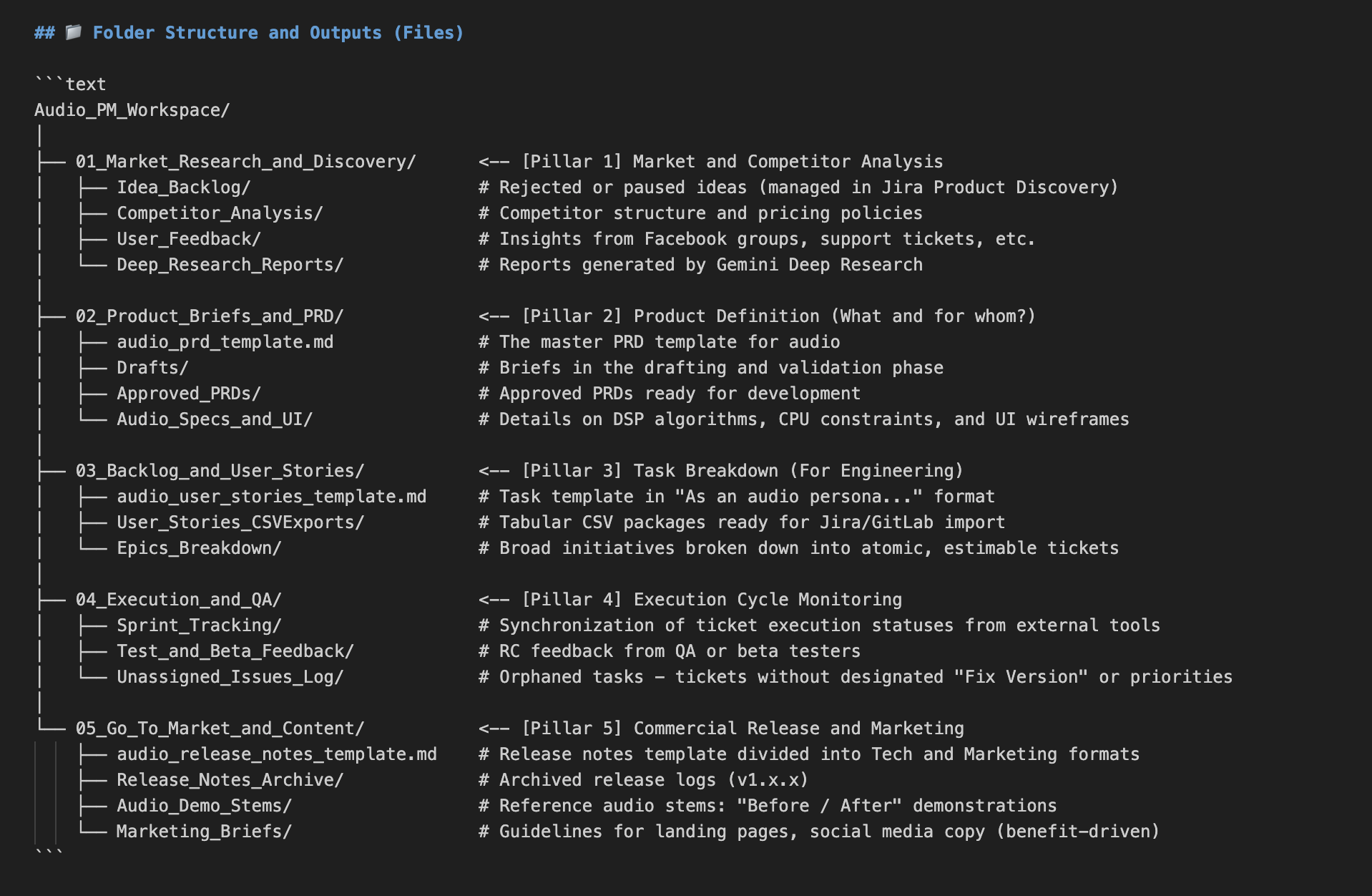
Figure 5 – Building the workspace in Antigravity
In this article, I deliberately omit developer tools like Codex from OpenAI or Gemini CLI. I also omit Google AI Studio and Platform for OpenAI, as they are designed for creating APIs. I haven’t studied them yet.
Beyond the Chatbox: Architecting an Autonomous Workflow
The true power of AI comes from moving beyond the chat interface to building an orchestration model. In this architecture, the LLM stops acting as a clumsy virtual assistant and becomes the strategic core, reading local markdown instructions (like predefined PRD process) while delegating the actual execution to robust, external infrastructure (exporting user stories to Jira).
While I haven’t yet come to that stage, here’s some information you will need
Data Integration via MCP (Model Context Protocol)
The foundation of a reliable AI system is secure, continuous data access. Instead of manually uploading context to the chat, the modern standard is deploying MCP servers. By connecting directly to corporate ecosystems—like Microsoft 365 via the Microsoft Graph API—the AI gains native, seamless access to OneDrive repositories, Outlook communications, and enterprise calendars. This is not a workaround; it is a direct, machine-to-machine conduit that feeds the AI the exact context it needs to operate autonomously, all while respecting enterprise security protocols.
The Execution Layer: Official APIs vs Unauthorised Bots
When it comes to output—such as distributing content across LinkedIn, Facebook, or Instagram—account safety and operational stability are paramount. Scraping tools and unauthorised bots are highly susceptible to platform updates and security triggers. The only sustainable path is utilising Official APIs. Official APIs guarantee that interactions with social platforms are legitimate, eliminating the risk of being flagged as malicious automated behaviour.
The Middleware Bridge: iPaaS (n8n, Make, Zapier)
While building custom scripts to interact with Official APIs offers ultimate control, it also introduces significant technical overhead—handling complex OAuth 2.0 token refreshes and navigating agonising App Review processes for platforms like Meta. The pragmatic, enterprise-grade solution is to inject middleware into the architecture. By utilising iPaaS (Integration Platform as a Service) solutions like n8n or Make, which act as pre-verified, trusted partners to these networks, we bypass the authentication headache. The workflow becomes extraordinarily clean: the AI processes the strategy locally and fires off a simple HTTP Webhook containing the finalised payload. The middleware catches this webhook and securely distributes the content across multiple official API endpoints. If you don’t want to pay for another subscription, you can install n8n locally on your machine for free.
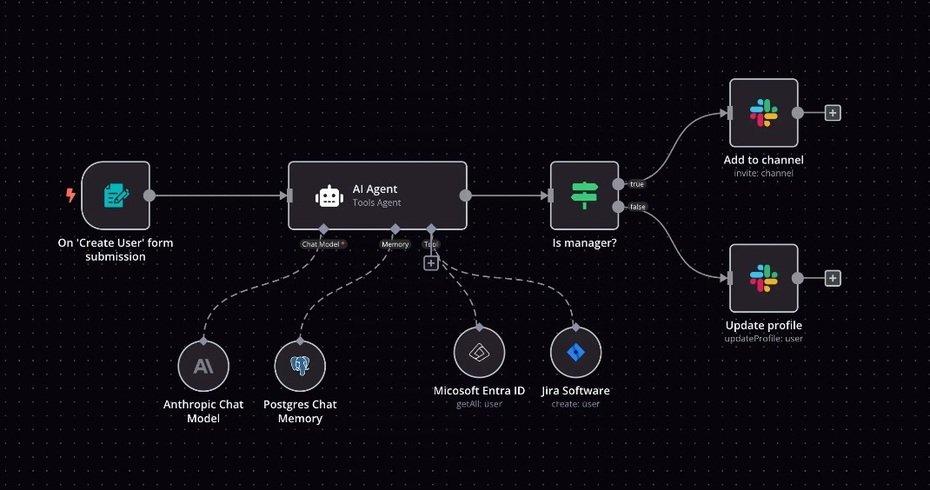
Figure 6 – n8n workflow (source:n8n)
Custom Extensibility
For highly specific edge cases where no official middleware module exists, the architecture remains fully extensible. In these scenarios, the AI can trigger custom, locally hosted Python scripts or bespoke MCP servers. This ensures that the system is never artificially limited by third-party software.
Conclusion
As mentioned in the beginning, this article is not a rewrite of already available resources about AI, but a report from my own investigation and attempts to build a semi-autonomous company. Not because I am obsessed with eleminating human from the loop but because I am curious. While it is still intimidating sometimes, a great thing about working with AI is that it can help even with setting itself up: it can help you to structure your own workspace, create instructions, and all the necessary templates. It can help to connect through MCP servers and APIs, create for you to these custom Python scripts, and bespoke MCP servers.
I’m not very enthusiastic about GenAI in creative industries as a way to make music or art. It is not that I have something against the technology, but honestly, I can’t understand why somebody would ever prefer to use AI-generated stems over working with a musician. But I can see the value of AI in reducing the overhead or helping small entrepreneurs to make some extra income.
If you’d like to learn how to use AI as a product manager, you can subscribe to the mailing list for the premiere of the upcoming online course: “AI-Augmented Product Manager” by Tomasz Żernicki, in the meatime I will report my progress in part two of this article in the next newsletter.