The music and audio production landscape is highly saturated, with a wide range of software and tools available. As a result, there are clear factors that influence why a user chooses one DAW over another
Introduction
So many music production tutorials and YouTube videos at some point will have said the following “this process can work in any digital audio workstation (DAW)” or “the specific DAW you use is irrelevant.” Now in theory, this can be a true statement: audio processing as a whole can be accomplished in a software that is designed for those applications. Regardless of these statements that have truth to them, people still gravitate towards one DAW over another.
Pro Tools, Ableton, Reaper, and FL Studio are some of the biggest tools for creating music throughout the world. With that said, shouldn’t they be equally the same if everyone is under the belief that any DAW is treated with the same framework?
The music and audio production landscape is highly saturated, with a wide range of software and tools available. As a result, there are clear factors that influence why a user chooses one DAW over another. Elements including user interface (UI) and cost all play a significant role in shaping these decisions. Understanding these key differentiators is essential when examining how users select their preferred DAW.
Primary Features and Functions
Like many pieces of software in any application, people respond to how they can navigate a product. If the UI is messy and logically is all over the place, the customer will go someplace else for their audio needs. To understand how this looks in context, we will look at a few DAWs to better understand how a UI can influence someone’s preference.
Pro Tools
The industry standard of audio production for many decades, Pro Tools designed their UI to replicate a traditional recording console workflow: flexible routing, signal paths, audio manipulation tools, etc. For people who came up in this form of production, it would make sense to work in this DAW. Dedicated sections for plug-in processing, aux sends, clip views, and more can be seen in a single window. Global and individual parameters can be altered for extremely flexible situations that ultimately have made this software to be seen as a workhorse product.
While Pro Tools can be used for creating music (and in some cases very well), certain functions and parameters are not as accessible compared to other DAWs. Creating quick arrangements and sections may be harder to naturally grasp then how FL Studio is designed (we will see this shortly). Again, while the same output can be attained, some DAWs have different places and techniques to acquire them. All developers will obtain user feedback to better understand what challenges customers are facing, to ultimately make solutions for.
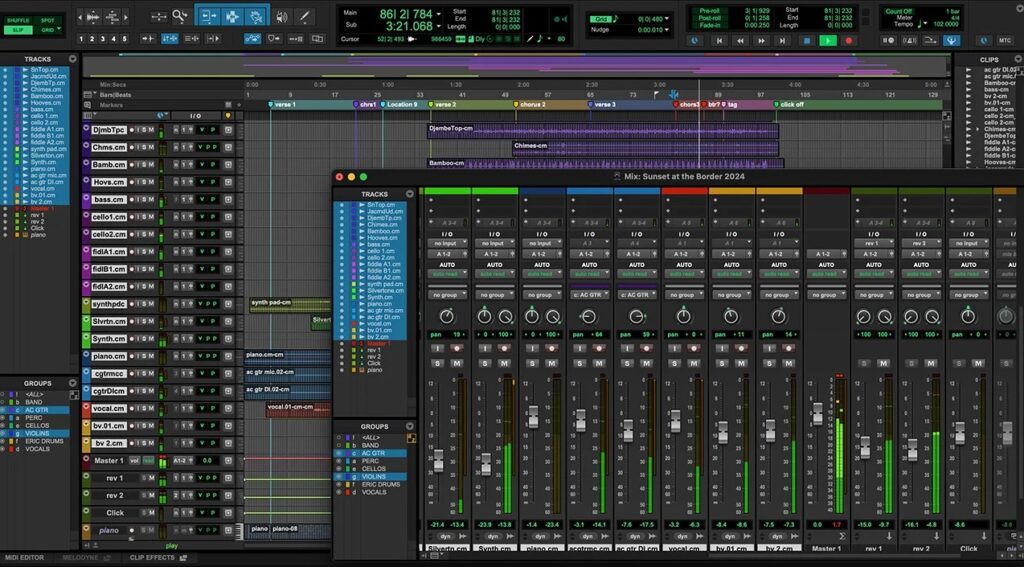
Fig. 1 Avid Pro Tools Software
FL Studio
This DAW has always been the center of music producers and beat makers. The UI is centered around patterns and clips that can be easily called up for creating complete song arrangements. Multiple motifs and and parts can be made, collected, and placed throughout the timeline, making song creation very fluid and straight-forward. Not to mention, their drum sequencer has become a fan-favorite that lets the user easily create drumkits with various samples of their choice.
However, when compared to an industry standard like Pro Tools, audio processing, routing, and manipulation isn’t as straightforward. Different windows and configurations are treated on lanes that the user has to define where the outputs go to. In theory, this is like any DAW, but creating flexible routing configurations to suit a more console-like workflow is a bit more challenging, but not impossible.
Ableton
Easily a fan-favorite for electronic and dance music production, Ableton’s UI seems to have some similarities compared to Pro Tools, but with some interesting differences. Plug-in processing is displayed as a row per track and has deep features that allow a user to quickly connect processors to each other for creative effect. Not to mention hardware units like the Ableton Push, the DAW welcomes other third-party controllers with ease. Unique to Ableton is the performer view that can load various samples into a template that is designed for live sampling and performance. Again, while DAWs inherently can all do this, Ableton makes it a primary feature for quick and streamlined efficiency.
Some people however may find it more difficult to mix in this program compared to Pro Tools, which has its own dedicated window for channel and processing on a global view scale. Being able to quickly access plugins and see what processing is applied to multiple tracks at once could be more important for a professional mixer than a songwriter, for example. Even though the end goal can be attained, Ableton takes a different approach that may require a few more steps to complete.
Reaper
This DAW has the same basic functions of clip-based and mixer-centric DAWs like Pro Tools and Ableton: a row of audio channels that also functions as track lanes with channel-based controls. But very unique to Reaper is scripting and plugin flexibility.
Scripting is the ability to create (or download from existing users) multi-function commands that have the ability to control software functions for specific templates and tasks. In essence, you can create automated commands to complete tasks that otherwise would take much more time to accomplish and or setup. Anything from creating multi-track setups to advanced parallel audio routing can be achieved. This in particular has become very popular in the game audio industry for organizing complex audio specifications.
The use of first and third-party plugins include useful options for sidechaining, custom routing, operation stability, and format support beyond other DAWs (i.e. CLAP, DX) creates an open-canvas environment for developers and post-production engineers to work with. Just like the Linux operating system, Reaper has deep customization capabilities that simply would be impossible to implement with competing brands.
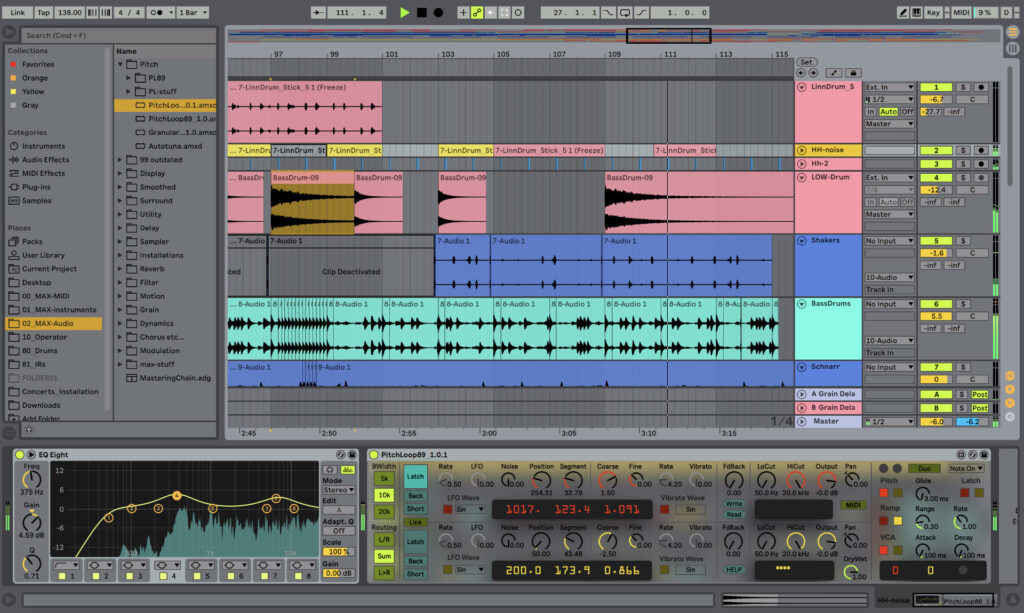
Fig. 2 Ableton Live Software
Real Talk: What’s the Cost?
Most people who use any software regularly will find a way to justify the cost, no matter how much. That being said, different methods of payment are found in this sector of the software-as-a-service (SaaS) business model. Let’s see how the three leading DAWs charge their user bases.
Pro Tools
Avid, the parent company of Pro Tools, offers a few different ways for someone to access the software:
- Perpetual + 1 year of upgrades included
- Higher cost for owning the software (up to a specific version)
- Annual/Monthly subscription with updates included
- At a smaller initial cost, but recurring unless canceled
These offerings do give people some flexibility for how they want to pay, but at some point, cost could be too high to maintain current updates. This may not matter to some people, but eventually, computers will only be able to support minimum versions. At that point, a user will ultimately be forced to upgrade both hardware and software until their current computer becomes obsolete.
FL Studio
Imagine Line, the developers of FL Studio, offer a few different versions of the software that include various creative plugins for an extra charge. But regardless of the version you purchase, updates are guaranteed…for life. A one-time purchase will include continuous upgrades without any extra cost (unless you want to upgrade to obtain the premium plugins). This option is very hard to beat, but remember: this DAW was designed primarily for songwriters in mind. Not to say you can’t accomplish the same functions that other DAWs have the ability to do, you may find your results will vary. Something to consider as you understand your needs in software.
Ableton
Very much a hybrid pricing model, Ableton offers three different paid tiers for their software. Ranging from limited to full feature sets, customers can choose what offerings they need for creating music. Purchasing any of the three versions of the DAW provides a perpetual license of that particular software. In theory, this is a great solution for most creators who simply want to pay once and get right to work. The hybrid model is that regardless of the three different pair tiers, you now own that version of the software forever, without ever worrying about recurring subscription pricing.
Having said this, Ableton charges a discounted rate (based on which version of the software you own) to upgrade to newer versions. For example, upgrading from Ableton 11 Standard to 12 Suite will come at a few hundred dollars. Like most software, compatibility with computer operating systems (OS) become outdated. At some point, unless you never change computers or OS, you’ll find yourself needing to update your products to keep up with features and technical specs. But for a lot of people, the occasional cost to update software is more appealing than a recurring monthly payment.
Reaper
A few options are available for purchasing the DAW, including a price tag of $0. While the 60-day memo will pop-up after that initial download, you can still use the DAW with no limitations. However, for continued support and version compatibility, two paid versions of $60 and $225 are available for individual and commercial use respectively. So unless you plan on staying on versions supported up to a certain number, you can pay nothing to have advanced scripting and plug-in compatibility (amongst other great features).
So…Are They All The Same?
At a basic fundamental foundation, DAWs are constructed to produce the same function: offer an easy-to-use solution for creating audio and music productions. It comes down to how the software outlines the functions, where certain workflows are more optimized than others, and how a customer pays for the product. Anyone can make a smash-hit on Ableton, Pro Tools, FL Studio, or any other DAW for that matter. But how you use the platform to your advantage is another discussion of its own. And if you have a preference for how you pay for the software, there are many options for you.
While only four DAWs were mentioned in this article, there are many other fantastic options that are used by some of the biggest engineers, songwriters, and more in the world. Logic Pro from Apple has become a fan-favorite for its one-time purchase option and phenomenal included virtual instruments. Cubase from Steinberg is very popular with film composers, including Oscar award-winning film scorer Hans Zimmer. And finally, Nuendo from Steinberg has advanced features that post-production studios around the world rely heavily on. No matter what DAW you choose, just know that there is one that will suit your needs over other choices.
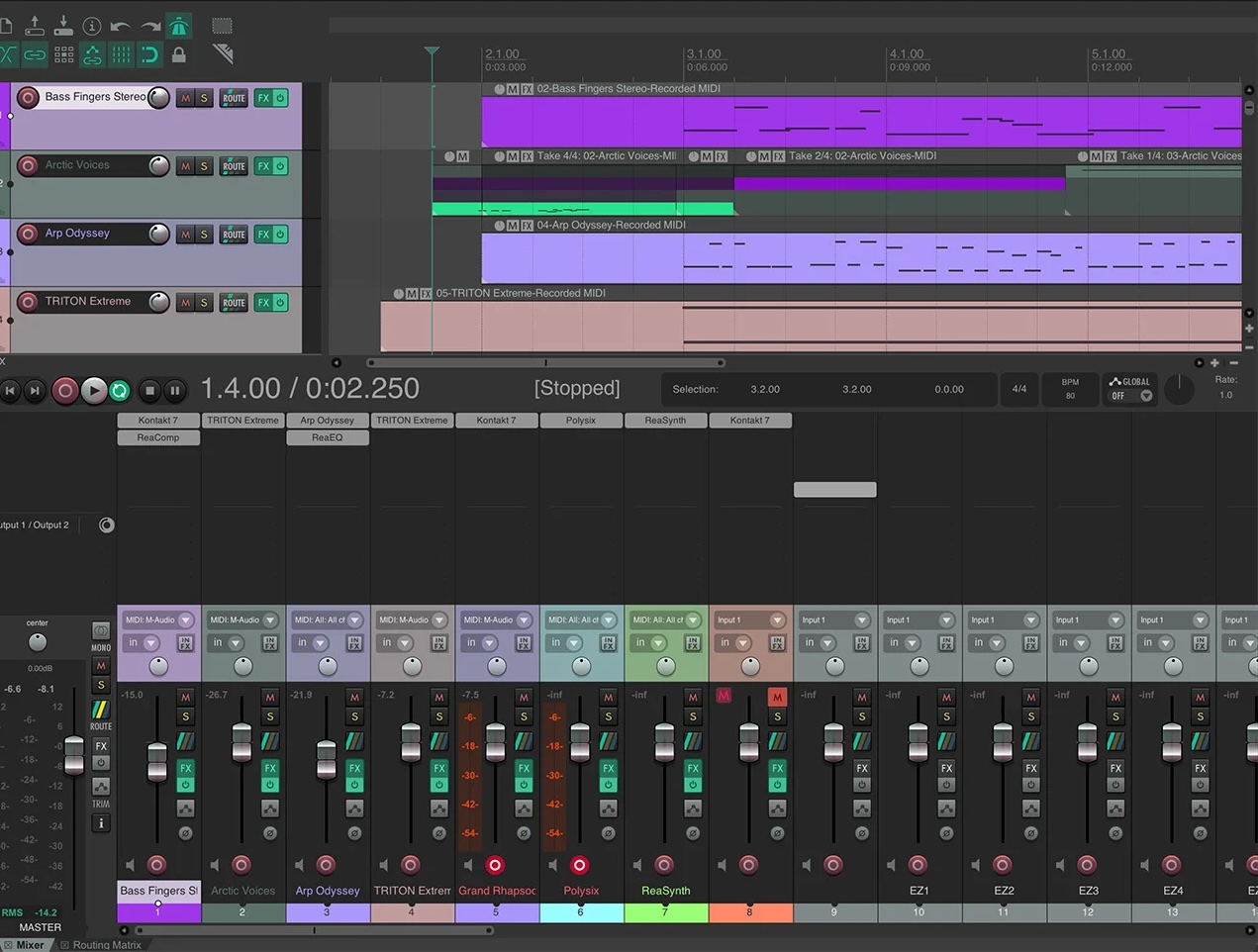
Fig. 3 Reaper DAW Software